

In today’s fast-paced world of software development, efficiency and speed are everything. With the rise of AI-powered coding assistants, developers now have access to intelligent tools that can enhance their workflow, improve accuracy, and reduce the time spent on repetitive tasks. One such cutting-edge AI tool is Windsurf AI.
Windsurf AI is a powerful coding assistant developed by Codeium that integrates smart code completion, multi-file editing, intelligent debugging, and real-time AI chat support into a seamless development experience. Whether you’re a beginner programmer or an experienced developer, Windsurf Editor is designed to make coding faster, smarter, and more intuitive.
In this guide, we’ll explore everything you need to know about Windsurf AI, including its features, pricing, Editor, rules, and common uses. If you’re looking for an in-depth review that will help you decide whether this AI tool is worth it, you’re in the right place.
What is Windsurf AI?
Windsurf AI is a next-generation AI-powered coding assistant designed to help developers write, debug, and optimise their code efficiently. Built with advanced machine learning models, Windsurf AI can predict coding actions, provide real-time suggestions, and automate routine programming tasks.
It is beneficial for developers working on large-scale projects, as it supports multi-file editing, intelligent code refactoring, and AI-powered debugging. With its deep context awareness, Windsurf AI understands your project structure and provides accurate recommendations to improve your coding workflow.
Key Features of Windsurf AI
The Key Features of Windsurf AI make it a game-changer for developers, offering powerful AI-driven tools that streamline coding, enhance accuracy, and boost productivity. With the Features of the Windsurf Editor, developers can work faster and smarter, leveraging AI-assisted automation, intelligent debugging, and seamless multi-file support. Whether you’re a beginner or an expert, this AI-powered tool ensures a smooth and efficient coding experience.
1. AI-Powered Smart Editor
The Windsurf Editor is an advanced IDE (Integrated Development Environment) that enhances developer productivity with AI-driven suggestions, intelligent debugging, and real-time code analysis.
Key Capabilities of the Smart Editor:
- AI-powered auto-completion for faster coding
- Context-aware code refactoring to keep your projects optimized
- Multi-file support for handling complex projects
- Error detection & debugging assistance
- Seamless integration with popular programming languages
The smart editor ensures that developers spend less time fixing errors and more time building innovative solutions.
2. AI “Flows” – Work Without Interruptions
Unlike traditional AI coding tools, Windsurf Editor introduces “Flows”, a unique feature that optimizes your workflow. Flows analyze your coding patterns and provide automated suggestions to streamline repetitive tasks.
How AI Flows Help Developers:
- Reduces coding interruptions by predicting the next steps
- Optimizes workflow by automating repetitive actions
- Ensures consistent coding patterns across large projects
With Flows, you can focus on writing high-quality code without worrying about syntax, formatting, or minor errors.
3. Cascade AI Chat – Your Intelligent Coding Assistant
One of the most impressive features of Windsurf is Cascade AI Chat, an interactive AI-powered assistant designed to help developers troubleshoot, understand, and improve their code.
Key Features of Cascade AI Chat:
- Real-time debugging suggestions
- Deep codebase analysis
- Context-aware recommendations
- Multi-file support for complex projects
- Code documentation generation
Instead of wasting time searching for solutions online, you can ask Cascade AI Chat for instant help directly in your editor.
4. Multi-File Editing & Intelligent Code Refactoring
Windsurf AI is not just a simple code completion tool—it offers advanced multi-file support that allows developers to work on large projects seamlessly.
Advantages of Multi-File Editing:
- Improved project consistency by applying changes across multiple files
- Better code structure with AI-powered refactoring
- Reduced debugging time by detecting errors across various components
This feature is especially useful for developers working on large-scale applications, frameworks, or collaborative projects.
5. AI-Enhanced Debugging & Command Execution
Debugging is one of the most time-consuming aspects of software development. With Windsurf , developers can quickly identify and fix errors using AI-powered debugging tools.
How AI-Driven Debugging Helps:
- Real-time error detection and suggested fixes
- Automated code review for performance improvements
- Quick command execution within the AI-powered IDE
This ensures that your projects run smoothly and efficiently without unnecessary debugging delays.
Windsurf AI Pricing Plans
Windsurf AI Pricing offers flexible plans tailored for developers at all levels. Whether you’re a beginner exploring AI tools or a professional working on large-scale projects, choosing the right Windsurf Editor Pricing plan ensures access to AI auto-completion, multi-file editing, and intelligent debugging. From a free version to a premium package, developers can select the best fit for their workflow and coding needs.
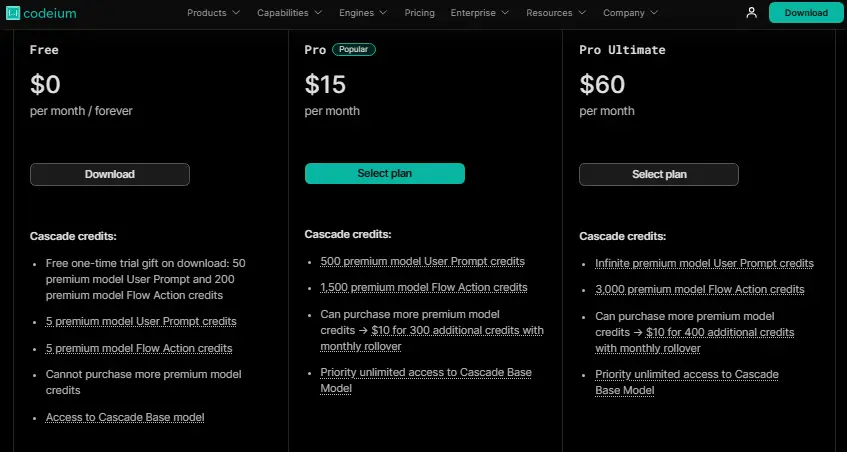
Free Plan – $0/month
- 5 User Prompt credits per month
- Unlimited AI auto-complete & in-editor chat
- Basic indexing & context awareness
Pro Plan – $15/month
- 500 User Prompt credits per month
- 1,500 Flow Actions per month
- Access to enhanced AI models
Pro Ultimate – $60/month
- Unlimited Prompt credits
- 3,000 Flow Actions per month
- Full access to all premium features
Check full pricing details here
Windsurf AI Rules & Best Practices
To get the most out of Windsurf Editor, follow these best practices:
- Utilize multi-file editing for efficient project management
- Enable AI “Flows” for uninterrupted development
- Use Cascade Chat for real-time problem-solving
- Leverage AI refactoring to maintain clean, optimized code
By following these rules, you can enhance productivity, improve code quality, and minimize errors.
How Developers Use Windsurf AI
Windsurf AI is widely used by developers for various purposes, including:
- Automating repetitive coding tasks
- Enhancing debugging with AI-driven suggestions
- Refactoring code efficiently for better performance
- Speeding up learning & skill development for beginners
Whether you’re a solo developer or part of a large team, Windsurf Editor can significantly improve your workflow.
Conclusion: Is Windsurf AI Worth It?
After using Windsurf AI, I can confidently say it’s a game-changer for developers. Whether you’re a beginner looking for AI-powered assistance or an experienced coder aiming to speed up your workflow, this tool makes a real difference. The AI auto-completion, intelligent debugging, and multi-file editing have saved me hours of work, and features like Cascade AI Chat make troubleshooting a breeze.
When it comes to Windsurf Editor Pricing, the flexibility is a huge plus. The free plan is great for testing, while the premium options provide advanced AI-driven automation for serious developers. If you’re wondering whether it’s worth the investment, I’d say—absolutely! It’s like having an AI-powered coding partner that helps you write better, faster, and smarter code.
So, if you’re on the fence, give Windsurf AI a shot.
READ MORE: Agentive AI: Uses, Benefits, Case Study & AI Sales Agents